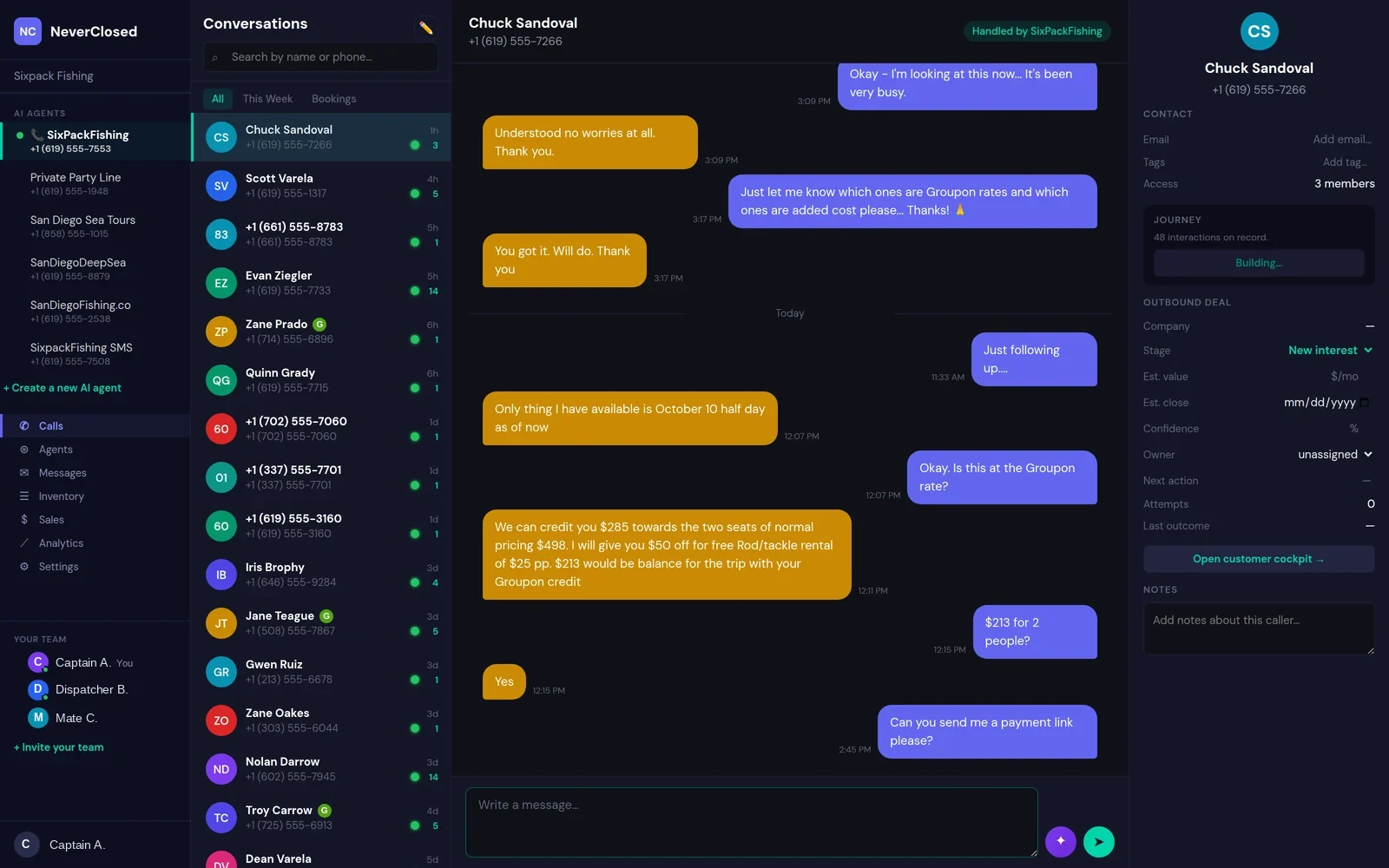
Here is the thing about AI call center communication that nobody tells you upfront: the technology itself is only half the battle. If you cannot see what it is doing, review what it said, or follow up appropriately - you are essentially flying blind.
The Communications Hub solves this problem. Every single conversation your AI agents have - voice calls, text messages, automated notifications - flows into a unified timeline. No more piecing together what happened from call logs, SMS platforms, and booking systems.
But the real magic is not just historical. The Hub shows you what is happening right now. Live transcripts scroll as conversations unfold. MCP tool usage lights up when your agent checks availability or processes a payment.
Conversation List and Contact Management
Contact List Sidebar
Scrollable list of all customer conversations sorted by most recent activity.
Phone Number Display
Each contact shows their phone number for quick reference.
Call Count Indicator
Shows the number of calls from each contact to identify frequent callers.
Relative Timestamps
Time since last interaction for prioritizing follow-ups.
Search Customers
Search bar finds specific customers by name, phone, or conversation content.
Contact Avatars
Color-coded initials for visual identification at a glance.
Voice Call Transcription Features
Complete Voice Transcripts
Full text transcription of every voice call with speaker labels.
Voice CallConversation Flow
Natural dialogue history showing how conversations progress.
Status Badges
COMPLETED for successful interactions, PENDING for in-progress, FAILED for errors.
COMPLETEDRefresh Conversation
Button to reload the latest messages during live calls.
MCP Tool Integration: The Communications Hub shows when your AI agent uses MCP tools during calls. Green badges indicate successful tool execution - availability checks, booking creation, payment processing.
MCP Tool Usage Tracking
Tool Usage Indicators
Purple labels mark when the AI called external tools.
MCP Tool UsageTool Execution Status
Each tool call shows its result: processing, COMPLETED, or FAILED.
Invisible to Customers
Tool operations happen seamlessly in the background.
SMS Message Integration
SMS Thread View
Text messages appear in the same conversation timeline as voice calls.
SMSPayment Links
Automated SMS with secure payment links that convert.
Delivery Status
SENT badge confirms message delivery to the carrier.
SENTCustomer Information Panel
Customer Profile
Full customer details: name, photo, SMS enabled status.
Contact Details
Phone and email with click-to-copy functionality.
Communication Preference
Shows preferred contact method for that customer.
PREFERRED: PHONECommunication History
Summary stats: Total Calls and SMS counts.
The Communications Hub transforms how you understand customer interactions. Instead of scattered data across voice logs, SMS platforms, and booking systems, everything converges into a single timeline.
For businesses running AI phone agents, this visibility is not optional. The Hub provides operational transparency that makes AI phone systems trustworthy enough to rely on around the clock.
Frequently Asked Questions
How accurate are the voice call transcripts?
Transcription accuracy typically exceeds 95% for clear calls. The system continuously improves through machine learning.
Can I search across all conversation transcripts?
Yes, the search function covers all text including voice transcripts, SMS messages, and customer notes.
What happens to conversation data if a customer requests deletion?
Customer data can be deleted upon request to comply with GDPR and CCPA.
How long are conversation transcripts retained?
By default, conversation data is retained indefinitely. You can configure automatic deletion policies.
Can multiple team members view conversations simultaneously?
Yes, the Communications Hub supports multiple concurrent users with real-time updates.
How do I know if an MCP tool action failed?
Failed tool actions display with a FAILED status badge in red with details about what went wrong.